AI call transcription: summaries, sentiment and tags after the call
AI call transcription is software that turns a recorded phone call into text once the call ends. It then summarizes the call, scores its sentiment and tags its topics, so you can read every call without listening to it.
In TrackDrive, the transcript arrives in minutes. Each line is labeled with who spoke, and keyword matches can fire webhooks and add data to the lead.
Why transcribe calls at all
Listening is the slow way to check calls: one reviewer, one call at a time, at the speed people talk.
A transcript turns each call into something you can read, search and filter. Disputes, quality checks and compliance reviews start from the words that were said, not from someone's memory of them.
How it works, step by step
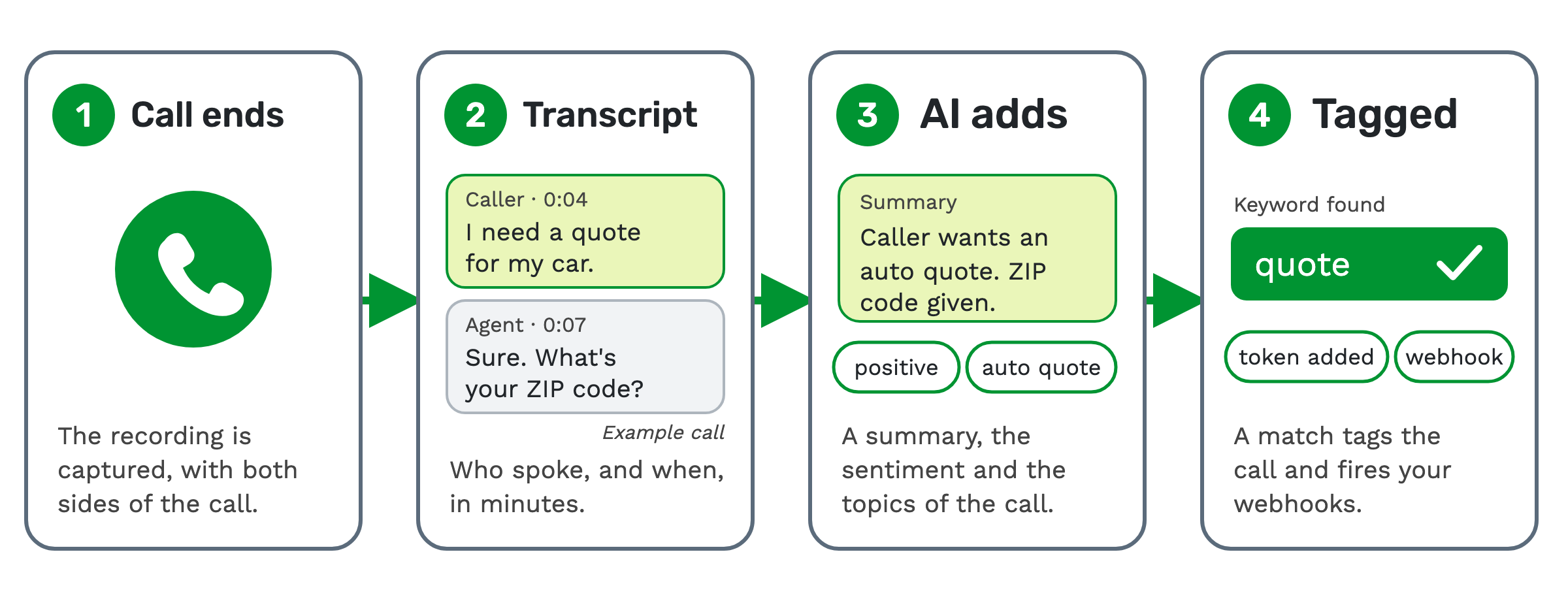
1. The call ends. The recording is captured, with both sides of the call. A channel is one side of the audio. Two-party recordings keep the caller on one channel and the agent or buyer on the other.
2. The transcript. The recording is transcribed into a speaker-labeled transcript, with timestamps, in minutes.
3. AI enrichment. AI reads the transcript and adds a summary, sentiment, topics and entities.
4. Keyword spotting. The transcript is scanned against your keyword groups. A match can fire webhooks and actions.
Then the dashboards update and every word becomes searchable.
What the AI adds to each transcript
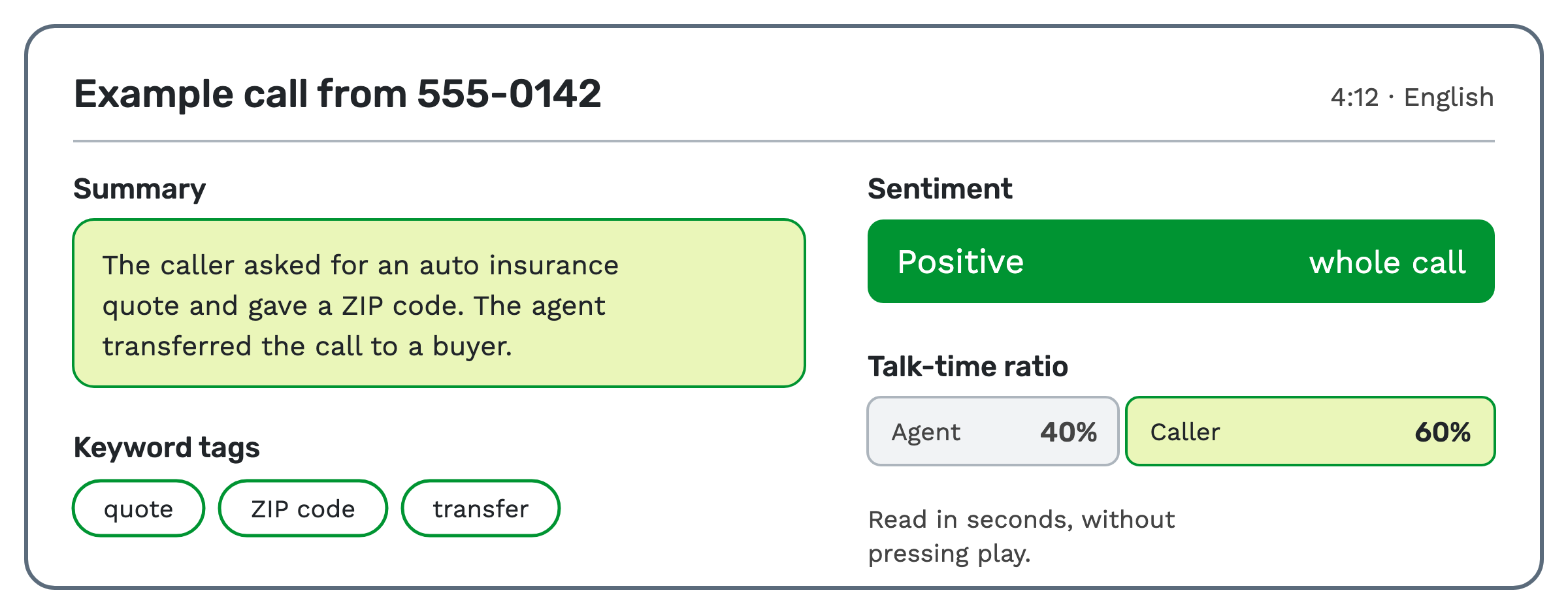
- A summary. A written recap of the call.
- Sentiment. Sentiment analysis rates the tone of the conversation as positive, neutral or negative. It's scored for each moment and for the whole call.
- Topics, entities and highlights. Categories are tagged, names and places are pulled out, and key phrases are surfaced.
- Language. The spoken language of each call is detected automatically.
- Talk-time ratio. The agent's share of the talking against the caller's, so you can catch a monologue.
On the recording itself, sentiment markers sit along the waveform. Click any line of the transcript to jump the audio to that moment.
How calls get tagged automatically
Tagging happens in two ways. The AI tags topics on its own. Keyword spotting tags the terms you choose.
A keyword group is a named list of words or phrases to detect. Matching ignores upper and lower case. For each entry you pick a detection channel: the caller, the other speakers, or everyone. Detecting on one side only works on a two-party recording, which is stereo.
When a keyword matches, three things can happen:
- The keyword is highlighted in the transcript and listed on the transcription record.
- Additional tokens are applied to the lead and the call. A token is a named field that carries a value, such as a reason code you define.
- Webhooks and other actions can fire. A webhook sends the call's data to another system the moment it happens.
That is how a call that mentions "cancel" can be flagged and sent to your own systems without anyone pressing play.
Tracking sentiment across all your calls
Every transcript rolls up into an analytics dashboard as soon as it finishes processing. It shows volume, sentiment mix, talk ratio, minutes and cost.
You can follow positive-sentiment trends by offer, agent and call center. A U.S. heat map shows positive sentiment by the caller's state.
Transcript search covers every word spoken on every call. You can filter by sentiment, offer, agent, call center, language or conversion.
Who uses it
QA and compliance teams use it to spot coaching moments, agent monologues and negative calls at a glance.
When it isn't the right tool
TrackDrive transcribes after the call ends, not while it's happening. If you need words on screen while the caller is still talking, this isn't that.
Transcription also needs a recording. Call recording is on by default at company level, and offers and buyers have their own Record Calls setting, so check it's on for the calls you want transcribed. Some call types, such as voice agent calls, always record.
How it works in TrackDrive
Transcription is set per offer. You enable it, pick the AI features that offer runs, and choose a transcription flow group. The flows decide which calls get transcribed.
Each flow has filters, so only matching calls are transcribed. It also says which recording to use: the full call, the caller and agent, or the caller and buyer.
The two-party recordings are stereo, with each speaker on their own channel. That gives more accurate transcription and a clean label for who said what. The transcription settings guide walks through each field.
PII redaction. You can remove personal data from the transcript before it's stored. You choose the categories, such as contact, financial or medical details. Redaction is billed at an extra per-minute rate. See PII redaction, or read PII redaction for calls and transcripts.
Audio from outside TrackDrive. You can submit any audio file through the REST API. The finished transcript is sent to your postback URL.
What it costs on TrackDrive
Post-call transcription is billed per minute. Commit plans lower the rate. See TrackDrive pricing for each tier.
The AI features you add are each priced per minute. Language detection is free. There are no seats, no platform fees and no onboarding fee, and every charge is itemized on the analytics dashboard.
Questions people ask
Is it live transcription? No. The transcript is written after the call ends and arrives in minutes. The dashboard is live in the sense that it updates as each transcript finishes.
Can it update a customer record? In part. A keyword match can apply tokens to the lead and the call, and fire webhooks to your own systems.
Can it score calls, too? Yes, as an add-on. AI call scoring grades transcribed calls on offers where you've set up a scorecard: 0 to 100 whenever a question applies. It's a per-minute add-on, and each recording of a call is scored and billed separately. It reads the transcript the call already has.
Which calls get transcribed? The ones your transcription flows match. Each flow has filters, so you can transcribe only the calls you need to read.
Where does it fit with call tracking? Inbound call tracking tells you where a call came from. Transcription tells you what was said once it got there.
See it in action
Request a demo for a live walkthrough tailored to your use case, or start free, with no credit card and no onboarding fee.