Call tracking for the insurance industry: routing, billable calls and disputes
Call tracking for the insurance industry ties each phone call to the ad, page or publisher behind it, then records what happened on the call. TrackDrive is the platform the calls run on, not a seller of them: its agreement calls it "strictly a conduit for routing communications".
Insurance call tracking comes in two kinds. An agency or carrier tracks calls from its own ads. In pay per call insurance, calls are bought and sold.
Pay per call is a model where a business pays for each qualified phone call. A publisher is the affiliate or ad channel that sends calls and earns a payout. A buyer is the call center or business that receives calls and pays for them.
As of 9 Nov 2026, no TrackDrive feature page or help article describes a tool only insurance campaigns can use. This article shows how the tools any campaign uses fit an insurance campaign.
Tracking your own insurance ads
A tracking number is a phone number tied to one source, so each call is credited to where it came from. Give each campaign or mailer its own. On a quote page, dynamic number insertion shows visitors numbers from a pool, with "a single snippet of JavaScript".
Claims and renewal callers aren't new business, so they shouldn't count as conversions from your ads. Give those lines their own number or their own offer. An offer is the home for one line of business: its tracking numbers, buyers, payouts and reporting.
How pay per call insurance works, step by step
Here is how auto insurance pay per call works, using one invented call and a 90-second billable duration.
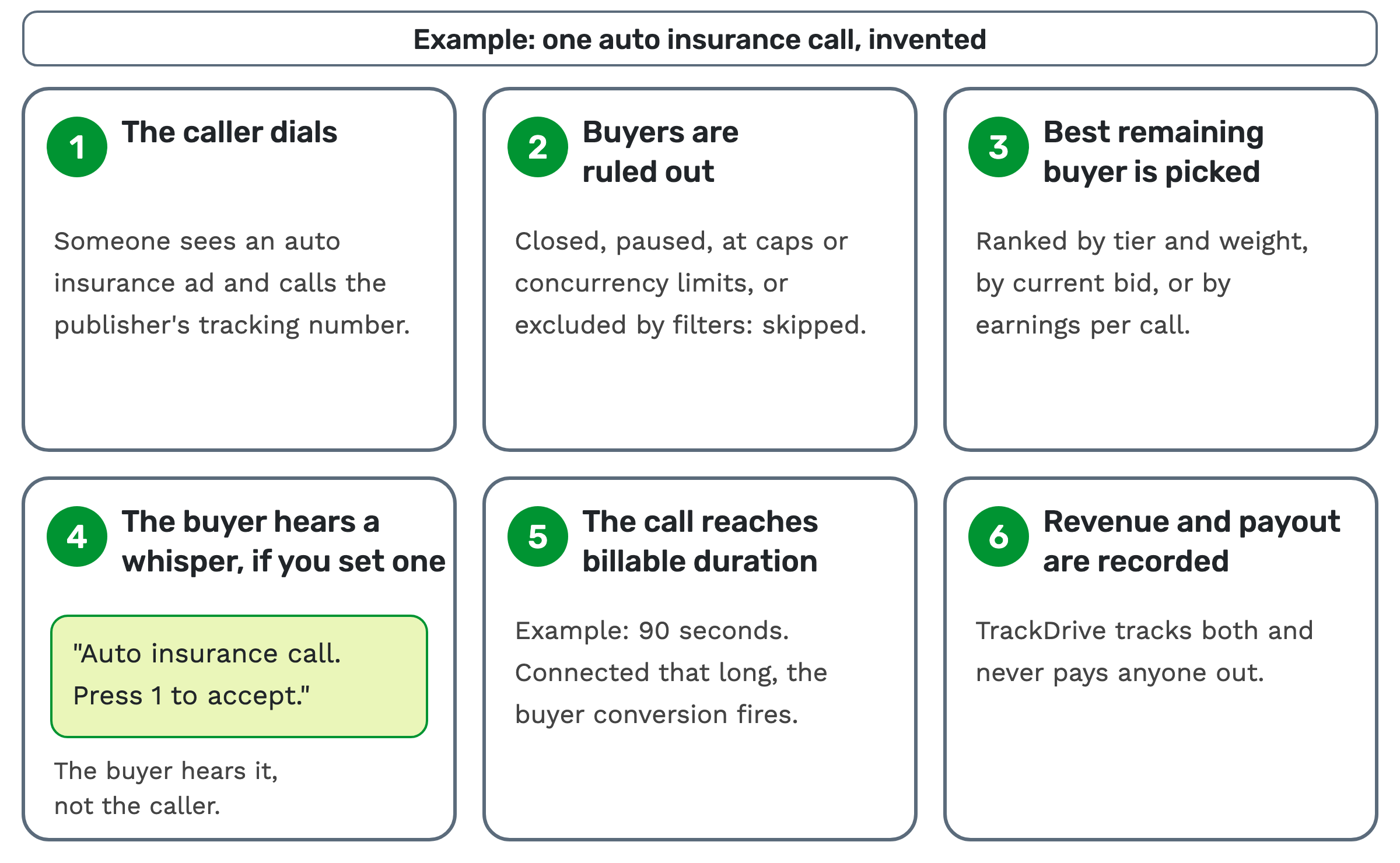 1. The caller dials. Someone sees an auto insurance ad and calls the publisher's tracking number. The number belongs
to an offer, so TrackDrive knows the line of business and the source.
2. Buyers are ruled out. Buyers that are closed, paused, at their caps or concurrency limits, or excluded by your filters are skipped.
3. The best remaining buyer is picked. Depending on each buyer's settings, buyers rank by tier and weight, by current bid, or by earnings per call. With ping-post, buyers bid before the call connects.
4. The buyer hears a whisper, if you set one. A whisper message plays "a brief message to the buyer before connecting". An example: "Auto insurance call. Press 1 to accept." If Press-1-to-accept is set up, the buyer pressing 1 starts the duration timer.
5. The call reaches billable duration. Billable duration is the minimum talk time before a call becomes payable. Here that's 90 seconds. A buyer conversion, the point where a call counts for that buyer, fires once the call has been connected that long.
6. Revenue and payout are recorded. Revenue is what the buyer pays for the call. Payout is what the publisher earns, under its own conversion rules, which can follow the buyer's conversion. TrackDrive tracks both and never pays anyone out.
The terms to agree before the first call
An insurance offer needs the same written terms as any other offer.
- Vertical. Auto, health or life, for example.
- Geography. The states the buyer can serve, which in insurance can mean its licensed states.
- Billable duration and payout. A buyer that must ask more before it can quote may want a longer minimum.
- Qualified call. What counts, in specific terms.
- Disputes. How long the buyer has to dispute a call.
Route calls only to states each buyer can serve
Insurance agents are licensed by state regulators. California, for one, has separate paths for resident and non-resident licenses. So a buyer may be able to serve only certain states.
A call from outside those states is wasted and can be a compliance problem. This is general education, not legal advice, so confirm the current requirements for your own campaigns.
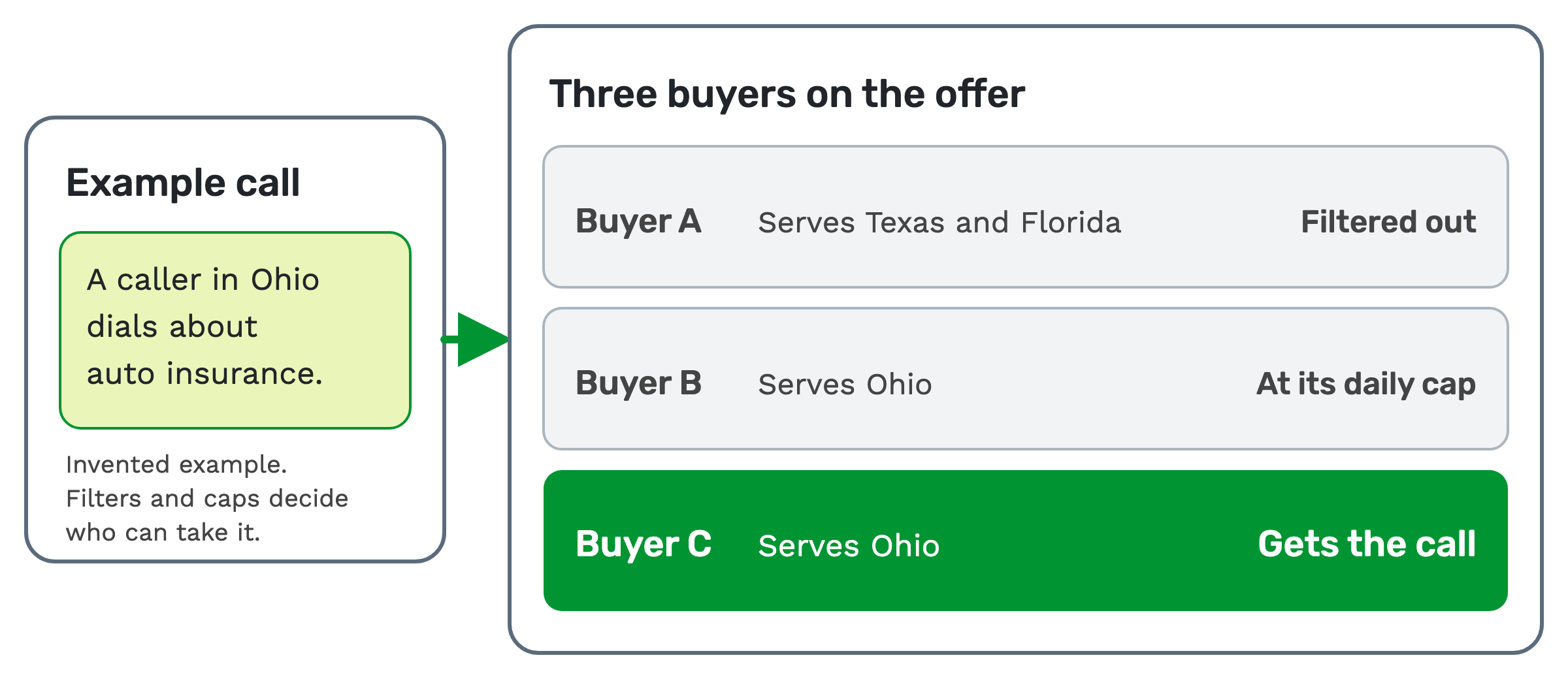
On a buyer or offer, geographic filters cover countries, states, zip code lists and USA or Canada area codes. A call is routed to a buyer only when it meets that buyer's filters. A 7-day by 24-hour grid sets when each buyer is eligible.
 Zip Code Append is off unless you turn it on for an offer. When it's on, it fills in a call's zip code from the caller's phone number before routing, unless the call already carries a valid one.
A zip filled in this way "may not be accurate if the caller has moved since getting the number". So have the agent confirm the caller's state too.
Your filters apply the states you enter. As of 9 Nov 2026, no TrackDrive feature page or help article describes checking a license. Keeping that list right stays with you and your buyer.
Plan caps around enrollment windows
HealthCare.gov lists Open Enrollment for Marketplace plans as November 1 to January 15, and some states have their own Marketplace. Those dates were read on 9 Nov 2026, so check them each year.
If your calls rise in a window like that, the limit is what each buyer can actually take.
A cap limits a buyer's attempts, connections, conversions or revenue; which ones are enabled is set per company. Hourly, daily and monthly caps reset on their own. A total cap never resets on its own; its limit can be raised by hand.
A concurrency cap is "the maximum number of simultaneously live calls". At that limit, the call flow skips to the next buyer.
A default call flow fires when every eligible buyer is at capacity. One option is a hold queue, where callers hold with music and connect as a buyer opens up.
If the queue is over its limits, the call isn't added, and the "queue is full" call flow decides. A scheduled callback is one choice. TrackDrive's pricing page lists scheduled callback calls as outbound dialing to consumers. Its help center says outbound dialing is gated by consent, Do Not Call and curfew rules.
Inbound insurance leads vs live transfers
An inbound insurance lead, in pay per call, is someone who dials a tracking number themselves. Routing connects them to a buyer, with no agent in between.
A live transfer is a call handed to a buyer while the caller is still on the line. It starts with someone who qualifies the caller, often an agent at a call center.
What settles a disputed call
A scrub is removing or disputing a call that fails the agreed rules. If a call came from a state outside the agreement, the buyer can scrub it, and that call isn't paid.
A disposition is an outcome an agent or the system assigns after a call, such as "not qualified".
Three records help when a call is challenged:
- The recording. Call recording is on by default at company level. Offers and buyers have their own Record Calls setting, so check it's on for the calls you may need to defend.
- The score. On offers where you've set up a scorecard, AI call scoring grades each transcribed call against it: a 0 to 100 score whenever a question applies. A No on any critical question marks the call Critical fail, whatever its score.
- The transcript. Insurance calls can include medical and financial details. You can redact transcripts before they're stored, at an additional per-minute rate. TrackDrive's agreement says you may not submit "protected health information, payment card numbers, passwords, or other sensitive personal information" through "any other method employing artificial intelligence features" (section 7.6). Read that before you transcribe health calls. As of 9 Nov 2026, no TrackDrive feature page or help article describes redacting the audio itself.
TrackDrive's terms disclaim liability for disputes over lead quality, lead conversion or payment for routed leads. So agree the dispute window in writing.
What compliance tools do, and what stays with you
This section is general education, not legal advice.
- Suppression lists. Numbers on a list attached to a buyer, offer or schedule are skipped before routing or dialing.
- Ping-post checks. On ping-post, pings can be DNC checked when the offer has DNC rejection turned on. It's off by default.
- Consent records. On agent-handled calls, when a Jornaya campaign ID is set up, TrackDrive captures the Jornaya LeadiD. It can also gate delivery to buyers through Jornaya TCPA Guardian.
TrackDrive's legal notice says these tools "do not, on their own, guarantee compliance". TrackDrive doesn't pre-check leads against the federal Do Not Call registry; scrub your lists before import.
The Telephone Consumer Protection Act regulates telemarketing calls and texts, including when consent is needed. A press-1 campaign plays a recorded message and connects people who press 1. Recorded telemarketing calls to consumers generally need prior express written consent under 47 CFR 64.1200.
TrackDrive's notice also says its platform is "not designed or guaranteed to serve as a permanent or long-term repository" for recordings. Keep your own copies.
What it costs on TrackDrive
Inbound calls are billed per minute, rounded up to the full minute. Each tracking number has a monthly rate. There's no onboarding fee. See TrackDrive pricing for the rates.
Questions people ask
What are pay per call insurance leads? They're calls a buyer pays for once they meet the agreed rules. Billable duration is the most common rule.
Where can I buy live transfer final expense leads? TrackDrive's agreement calls it "strictly a conduit for routing communications". It's a platform for tracking, routing and recording calls, so look to a network or publisher for the leads.
Does TrackDrive have insurance-specific features? Not as of 9 Nov 2026: no feature page or help article describes a tool only insurance campaigns can use. The same offers, buyers, filters and caps serve every vertical. TrackDrive's AI call scoring page uses insurance examples. You can start from a template and edit its questions, or write your own.
See it in action
Request a demo for a live walkthrough tailored to your use case, or start free, with no credit card and no onboarding fee.